Saturday, October 24, 2015

Excited ! -
Oracle OpenWorld is just around the corner - Have one presentation at OOW this year -

Topic - Harness the Power of Big Data with Oracle
Time - 25 Oct 12 Noon
Location - Mascone South 102

Hope to meet you guys

Thursday, June 11, 2015

You would have never thought that this feature would help in Tuning

The word "Tuning" should be in discussion right at the initial stage of your design and not just after shipping you code to production. In most of the environments have worked, The attitude to ship the code first - meet the timelines and tune later was prominent.  Let us see once such use case now,  


SQL> select * from tblchk tbl1 where exists
  2  (select 1 from tblchk tbl2 where tbl1.id=tbl2.id and tbl2.id_val='ORACLE');

no rows selected

 
And the Plan
-----------------------------------------------------------------------------------------------------------------------------                         
| Id  | Operation            | Name   | Starts | E-Rows | A-Rows |   A-Time   | Buffers | Reads  |  OMem |  1Mem | Used-Mem |                         
-----------------------------------------------------------------------------------------------------------------------------                         
|   0 | SELECT STATEMENT     |        |      1 |        |      0 |00:00:00.01 |     487 |     12 |       |       |          |                         
|*  1 |  HASH JOIN RIGHT SEMI|        |      1 |    190K|      0 |00:00:00.01 |     487 |     12 |  1645K|  1645K|  488K (0)|                         
|*  2 |   TABLE ACCESS FULL  | TBLCHK |      1 |  36663 |      0 |00:00:00.01 |     487 |     12 |       |       |          |                         
|   3 |   TABLE ACCESS FULL  | TBLCHK |      0 |    220K|      0 |00:00:00.01 |       0 |      0 |       |       |          |                         
-----------------------------------------------------------------------------------------------------------------------------                         
                                                                                                                                                      
Predicate Information (identified by operation id):                                                                                                   
---------------------------------------------------                                                                                                   
                                                                                                                                                      
   1 - access("TBL2"."ID"="TBL1"."ID")                                                                                                                
   2 - filter("TBL2"."ID_VAL"='ORACLE')                                                                                                                

no records, let us check the 10046 trace to dig further
PARSING IN CURSOR #140069498436864 len=112 dep=0 uid=143 oct=3 lid=143 tim=47991926417 hv=368497245 ad='74031300' 
sqlid='7w4sr0cazdnkx'
select * from TBLCHK tbl1 where EXISTS
(select 1 from tblchk tbl2 where tbl2.id=tbl1.id and tbl2.id_val='ORACLE')
END OF STMT
PARSE #140069498436864:c=37000,e=37341,p=0,cr=52,cu=0,mis=1,r=0,dep=0,og=1,plh=1090576670,tim=47991926414
EXEC #140069498436864:c=0,e=57,p=0,cr=0,cu=0,mis=0,r=0,dep=0,og=1,plh=1090576670,tim=47991926538
WAIT #140069498436864: nam='SQL*Net message to client' ela= 4 driver id=1413697536 #bytes=1 p3=0 obj#=-1 tim=47991926621
WAIT #140069498436864: nam='Disk file operations I/O' ela= 51 FileOperation=2 fileno=10 filetype=2 obj#=96213 tim=47991928267
WAIT #140069498436864: nam='db file sequential read' ela= 18 file#=10 block#=24289 blocks=1 obj#=96213 tim=47991928350
WAIT #140069498436864: nam='db file sequential read' ela= 10 file#=10 block#=24296 blocks=1 obj#=96213 tim=47991928573
WAIT #140069498436864: nam='db file sequential read' ela= 9 file#=10 block#=24298 blocks=1 obj#=96213 tim=47991928655
WAIT #140069498436864: nam='db file scattered read' ela= 15 file#=10 block#=24335 blocks=2 obj#=96213 tim=47991928977
WAIT #140069498436864: nam='db file sequential read' ela= 13 file#=10 block#=24375 blocks=1 obj#=96213 tim=47991930095
WAIT #140069498436864: nam='db file sequential read' ela= 57 file#=10 block#=24427 blocks=1 obj#=96213 tim=47991930962
WAIT #140069498436864: nam='db file sequential read' ela= 11 file#=10 block#=24429 blocks=1 obj#=96213 tim=47991931099
WAIT #140069498436864: nam='db file sequential read' ela= 10 file#=10 block#=24434 blocks=1 obj#=96213 tim=47991931216
WAIT #140069498436864: nam='db file sequential read' ela= 10 file#=10 block#=24438 blocks=1 obj#=96213 tim=47991931313
WAIT #140069498436864: nam='db file sequential read' ela= 16 file#=10 block#=24560 blocks=1 obj#=96213 tim=47991933732
WAIT #140069498436864: nam='db file sequential read' ela= 14 file#=10 block#=24687 blocks=1 obj#=96213 tim=47991935137
FETCH #140069498436864:c=9000,e=8564,p=12,cr=487,cu=0,mis=0,r=0,dep=0,og=1,plh=1090576670,tim=47991935230
STAT #140069498436864 id=1 cnt=0 pid=0 pos=1 obj=0 op='HASH JOIN RIGHT SEMI (cr=487 pr=12 pw=0 time=8566 us cost=207 size=2280096 card=190008)'
STAT #140069498436864 id=2 cnt=0 pid=1 pos=1 obj=96213 op='TABLE ACCESS FULL TBLCHK (cr=487 pr=12 pw=0 time=8425 us cost=103 size=219978 card=36663)'
STAT #140069498436864 id=3 cnt=0 pid=1 pos=2 obj=96213 op='TABLE ACCESS FULL TBLCHK (cr=0 pr=0 pw=0 time=0 us cost=103 size=1320000 card=220000)'
*** 2015-05-28 13:29:31.638
WAIT #140069498436864: nam='SQL*Net message from client' ela= 18769385 driver id=1413697536 #bytes=1 p3=0 obj#=96213 tim=48010704804
CLOSE #140069498436864:c=0,e=16,dep=0,type=0,tim=48010704946

TkProf

select * from TBLCHK tbl1 where EXISTS
(select 1 from tblchk tbl2 where tbl2.id=tbl1.id and tbl2.id_val='ORACLE')

call     count       cpu    elapsed       disk      query    current        rows
------- ------  -------- ---------- ---------- ---------- ----------  ----------
Parse        1      0.03       0.03          0         52          0           0
Execute      1      0.00       0.00          0          0          0           0
Fetch        1      0.00       0.00         12        487          0           0
------- ------  -------- ---------- ---------- ---------- ----------  ----------
total        3      0.04       0.04         12        539          0           0

Misses in library cache during parse: 1
Optimizer mode: ALL_ROWS
Parsing user id: 143  
Number of plan statistics captured: 1

Rows (1st) Rows (avg) Rows (max)  Row Source Operation
---------- ---------- ----------  ---------------------------------------------------
         0          0          0  HASH JOIN RIGHT SEMI (cr=487 pr=12 pw=0 time=8566 us cost=207 size=2280096 card=190008)
         0          0          0   TABLE ACCESS FULL TBLCHK (cr=487 pr=12 pw=0 time=8425 us cost=103 size=219978 card=36663)
         0          0          0   TABLE ACCESS FULL TBLCHK (cr=0 pr=0 pw=0 time=0 us cost=103 size=1320000 card=220000)


Elapsed times include waiting on following events:
  Event waited on                             Times   Max. Wait  Total Waited
  ----------------------------------------   Waited  ----------  ------------
  SQL*Net message to client                       1        0.00          0.00
  Disk file operations I/O                        1        0.00          0.00
  db file sequential read                        10        0.00          0.00
  db file scattered read                          1        0.00          0.00
  SQL*Net message from client                     1       18.76         18.76


hmm After all these waits events, it has figured that my data is not there. Instead of this can i have something similar to an ledger, which could be used to cross check and validate before even moving on to next step. After creating a ledger to hold the values take a look at the 10046 and TKProf below -- ledger :) scroll down to know more

PARSING IN CURSOR #140503816846712 len=112 dep=0 uid=143 oct=3 lid=143 tim=47001392270 hv=2403129567 ad='79a60d48' sqlid='a8sqfsu7mtq6z'
select * from tblchk tbl1 where exists
(select 1 from tblchk tbl2 where tbl1.id=tbl2.id and tbl2.id_val='ORACLE')
END OF STMT
PARSE #140503816846712:c=30000,e=30955,p=0,cr=58,cu=0,mis=1,r=0,dep=0,og=1,plh=2472364079,tim=47001392254
EXEC #140503816846712:c=0,e=107,p=0,cr=0,cu=0,mis=0,r=0,dep=0,og=1,plh=2472364079,tim=47001392773
WAIT #140503816846712: nam='SQL*Net message to client' ela= 8 driver id=1413697536 #bytes=1 p3=0 obj#=653 tim=47001393166
FETCH #140503816846712:c=0,e=16,p=0,cr=0,cu=0,mis=0,r=0,dep=0,og=1,plh=2472364079,tim=47001393231
STAT #140503816846712 id=1 cnt=0 pid=0 pos=1 obj=0 op='FILTER  (cr=0 pr=0 pw=0 time=10 us)'
STAT #140503816846712 id=2 cnt=0 pid=1 pos=1 obj=0 op='HASH JOIN RIGHT SEMI (cr=0 pr=0 pw=0 time=0 us cost=207 size=2280096 card=190008)'
STAT #140503816846712 id=3 cnt=0 pid=2 pos=1 obj=96213 op='TABLE ACCESS FULL TBLCHK (cr=0 pr=0 pw=0 time=0 us cost=103 size=219978 card=36663)'
STAT #140503816846712 id=4 cnt=0 pid=2 pos=2 obj=96213 op='TABLE ACCESS FULL TBLCHK (cr=0 pr=0 pw=0 time=0 us cost=103 size=1320000 card=220000)'

*** 2015-05-28 13:13:10.959
WAIT #140503816846712: nam='SQL*Net message from client' ela= 28632273 driver id=1413697536 #bytes=1 p3=0 obj#=653 tim=47030025871
CLOSE #140503816846712:c=0,e=17,dep=0,type=0,tim=47030025999
No db file sequential read wow And the TKProf looks like below -
select * from tblchk tbl1 where exists
(select 1 from tblchk tbl2 where tbl1.id=tbl2.id and tbl2.id_val='ORACLE')

call     count       cpu    elapsed       disk      query    current        rows
------- ------  -------- ---------- ---------- ---------- ----------  ----------
Parse        1      0.01       0.01          0          0          0           0
Execute      1      0.00       0.00          0          0          0           0
Fetch        1      0.00       0.00          0          0          0           0
------- ------  -------- ---------- ---------- ---------- ----------  ----------
total        3      0.01       0.01          0          0          0           0

Misses in library cache during parse: 1
Optimizer mode: ALL_ROWS
Parsing user id: 143  
Number of plan statistics captured: 1

Rows (1st) Rows (avg) Rows (max)  Row Source Operation
---------- ---------- ----------  ---------------------------------------------------
         0          0          0  FILTER  (cr=0 pr=0 pw=0 time=10 us)
         0          0          0   HASH JOIN RIGHT SEMI (cr=0 pr=0 pw=0 time=0 us cost=207 size=2280096 card=190008)
         0          0          0    TABLE ACCESS FULL TBLCHK (cr=0 pr=0 pw=0 time=0 us cost=103 size=219978 card=36663)
         0          0          0    TABLE ACCESS FULL TBLCHK (cr=0 pr=0 pw=0 time=0 us cost=103 size=1320000 card=220000)


Elapsed times include waiting on following events:
  Event waited on                             Times   Max. Wait  Total Waited
  ----------------------------------------   Waited  ----------  ------------
  SQL*Net message to client                       1        0.00          0.00
  SQL*Net message from client                     1       28.63         28.63

So what is this Ledger - How could Oracle do this, with out even going to your data it would say you don't have it :)- it because of this
SQL> select distinct id_val from tblchk;

ID_VAL
-----------
  A
  B
  C
Since i know for sure am not going to hold ORACLE in id_val column , check constraint on ID_VAL column is added
alter table tblchk add CONSTRAINT check_idval CHECK (id_val in ('A','B','C'));
Our Ledger = Check Constraint which directed the optimizer in doing this. Though this looks soo cheap tactic, Isn't this helping me. Why should i do all the scan to just say you don't have it, when am pretty sure that i don't have it though.

Sunday, November 2, 2014

I'm Speaking @ SANGAM14


Getting ready for the major event - SANGAM14 - AIOUG keeps all the techies under a single roof. I am presenting the below topics this year, If you happen to be attending, please stop by and say hello. We’d love to meet you and chat with the Oracle Community.

Oracle 12c In-database Analytic's


Its gonna be a 'WHAT IF SESSIONS',   

Sunday, February 2, 2014

Oracle 12c - With Clause Enhancements

5 Mins Blog

Until Oracle 12c, we have been using WITH Clause to replace  
  • Sub-query
  • Correlated Subqueries 
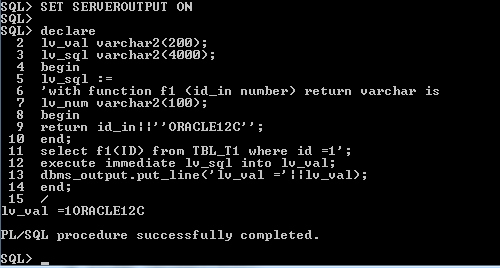
Now to this you can define PLSQL declarations in a WITH Clause statement from Oracle 12c. 
Blogged in the same chronological order,  I encountered errors 


In SQL-Developer


Look what i get 


Oops, let try with Sqlplus


 Isn't ";" the terminator for the SQL Statement,  


how about Update 


Is update not supported ?

hmm, Ok how about inside a plsql


Are these restrictions ?

Lets see one by one, 

         WITH Clause with inline PLSQL are supported only in SQL Developer Version 4.0, check this link to see the number of bugs fixed in SQL Developer 4.0 

WITH Clause with inline PLSQL query from - Sql Developer Version 4.0


WITH Clause with PLSQL Declaration - "/" is the query terminator


Update - WITH Clause with PLSQL Declaration -

       From Oracle Documentation 'If the top-level statement is a DELETE, MERGE, INSERT, or UPDATE statement, then it must have the WITH_PLSQL hint", 


Note from Oracle Documentation:" Hint - /*+ WITH_PLSQL */  is not an optimizer hint, it is just to specify the WITH PLSQL Declaration clause within the statement "


WITH Clause with PLSQL Declaration inside a PLSQL Block
  
         You cannot execute WITH Clause with PLSQL Declaration directly inside a PLSQL Block, but can be executed as dynamic SQL


SQL's making use of functions, Functions !!!! which are yet not stored objects is the key benefit we get and can be of great use for one time data migration scripts, for which you really don't want write stored functions.

Thanks for reading, feel free to leave your comments. Let's see about performance benefits in the next post  

Sunday, January 19, 2014

Oracle 12c - PLSQL index by table to Java/SQL

My application front end is Java and DB is Oracle. What array should i use in my PLSQL - program parameters to enable JDBC application to invoke them ?

          Until Oracle 11g, The type has to be defined at the schema-level to enable JDBC applications to interface with PLSQL programs. Now in Oracle 12c this restriction is completely removed.

Let's do some blogging

Before we start with Oracle 12c, lets see these restrictions in Oracle 11g.

CREATE OR REPLACE PACKAGE pkg_plsql_12c
AS
TYPE subject IS TABLE OF VARCHAR2 (100) INDEX BY PLS_INTEGER;

TYPE Marks IS RECORD
  (Maths   NUMBER,
    Physics NUMBER );
    
  PROCEDURE input_is_boolean(
      p_name  IN VARCHAR2,
      p_print IN BOOLEAN);
  PROCEDURE print_subjects(
      p_subject IN subject);
  PROCEDURE print_marks(
      p_marks IN marks);
      
END pkg_plsql_12c;
/
CREATE OR REPLACE PACKAGE BODY pkg_plsql_12c
AS
PROCEDURE input_is_boolean(
    p_name  IN VARCHAR2,
    p_print IN BOOLEAN)
IS
BEGIN
  IF p_print THEN
    DBMS_OUTPUT.put_line (p_name);
  ELSE
    DBMS_OUTPUT.put_line ('I DINT PRINT YOUR NAME');
  END IF;
END input_is_boolean;

PROCEDURE print_subjects(
    p_subject IN subject)
IS
BEGIN
  FOR idx IN 1 .. p_subject.COUNT
  LOOP
    DBMS_OUTPUT.put_line ( p_subject (idx));
  END LOOP;
END print_subjects;

PROCEDURE print_marks(
    p_marks IN marks)
IS
BEGIN
  DBMS_OUTPUT.put_line ( 'MATHS--'||p_marks.MATHS);
  DBMS_OUTPUT.put_line ( 'PHYSICS--'||p_marks.PHYSICS);
END print_marks;
END pkg_plsql_12c;
/

In 11g
SQL> select * from v$version;
 
BANNER
--------------------------------------------------------------------------------
 
Oracle Database 11g Enterprise Edition Release 11.2.0.1.0 - Production
PL/SQL Release 11.2.0.1.0 - Production
CORE    11.2.0.1.0      Production
TNS for 32-bit Windows: Version 11.2.0.1.0 - Production
NLSRTL Version 11.2.0.1.0 - Production


DECLARE
   lv varchar2(10) := 'ORACLE';
   lv_subjects   pkg_plsql_12c.subject;
   lv_marks   pkg_plsql_12c.marks;
BEGIN

  BEGIN
     EXECUTE IMMEDIATE
        'BEGIN pkg_plsql_12c.input_is_boolean(:Name, :Bool); END;'
        USING lv, TRUE; 
  END;
  
  BEGIN
   lv_subjects(1):='ORACLE ASSOCIATIVE ARRAY';   
   EXECUTE IMMEDIATE
      'BEGIN pkg_plsql_12c.print_subjects (:sub); END;'
      USING lv_subjects;   
  END;
  
  BEGIN
  lv_marks.maths := 100;
  lv_marks.physics := 99;
     
     EXECUTE IMMEDIATE
      'BEGIN pkg_plsql_12c.print_marks (:mark); END;'
      USING lv_marks;    
  END;    
END;
Error at line 3
ORA-06550: line 10, column 19:
PLS-00457: expressions have to be of SQL types
ORA-06550: line 8, column 6:
PL/SQL: Statement ignored
ORA-06550: line 17, column 13:
PLS-00457: expressions have to be of SQL types
ORA-06550: line 15, column 4:
PL/SQL: Statement ignored
ORA-06550: line 26, column 13:
PLS-00457: expressions have to be of SQL types
ORA-06550: line 24, column 6:
PL/SQL: Statement ignored

Script Terminated on line 3.

Until Oracle 11g, If an SQL has to be invoked from PLSQL, only SQL supported data types can be bound.The New feature in Oracle 12c is all about - " PLS-00457: expressions have to be of SQL types "

New in 12.1 -        
          Oracle as relaxed these rules, It is possible to

1. Bind a Boolean to an Anonymous Block
2. Bind Records and associative arrays to an Anonymous Block

Lets execute the same in Oracle 12c

SQL> select banner from v$version;

BANNER
-------------------------------------------------------------------------------

Oracle Database 12c Enterprise Edition Release 12.1.0.1.0 - 64bit Production
PL/SQL Release 12.1.0.1.0 - Production
CORE    12.1.0.1.0      Production
TNS for 64-bit Windows: Version 12.1.0.1.0 - Production
NLSRTL Version 12.1.0.1.0 - Production

DECLARE
  lv VARCHAR2(10) := 'ORACLE';
  lv_subjects pkg_plsql_12c.subject;
  lv_marks pkg_plsql_12c.marks;
BEGIN
  -------BOOLEAN------------
  EXECUTE IMMEDIATE 'BEGIN pkg_plsql_12c.input_is_boolean(:Name, :Bool); END;' USING lv, TRUE;  
  
  ---ORACLE ASSOCIATIVE ARRAY---------
    lv_subjects(1):='ORACLE ASSOCIATIVE ARRAY';
    EXECUTE IMMEDIATE 'BEGIN pkg_plsql_12c.print_subjects (:sub); END;' USING lv_subjects;
  
  ----------RECORD-------------
    lv_marks.maths   := 100;
    lv_marks.physics := 99;
   EXECUTE IMMEDIATE 'BEGIN pkg_plsql_12c.print_marks (:mark); END;' USING lv_marks;    

END;
/
anonymous block completed
ORACLE
ORACLE ASSOCIATIVE ARRAY
MATHS--100
PHYSICS--99

From Oracle 12c - JDBC applications can call procedure with associative array parameters provided the associative array is declared in a package specification.. You can only index by PLS_INTEGER which must be positive and dense.


Thanks for reading, feel free to leave your comments.          


Tuesday, June 11, 2013

Derived Objects Replication Using Oracle Goldengate

As usual with questions, 
  1. I have my source and target schema names different, do we need to check something during replication
  2. Should i worry about schema name being referenced while issuing DDL at source

Yes its about derived objects and its impact during replication using Oracle Goldengate. So what do you mean by derived objects, 


Lets see how does the inclusion of schema name impact Oracle Goldengate replication. 

Details of setup 
Source DB        - OMS
Schema Name - hari
Target DB         - OGG
Schema Name - puthranv

Before getting into Derive Objects Replication, Lets start with 

  1. OGG process setup
  2. DML Replication
  3. DDL Replication and then 
  4. Derived Object Replication

At Source - Basic info 
SQL> 
SQL> 
SQL> show user
USER is "HARI"
SQL> 
SQL>
SQL> select * from v$version;

BANNER
--------------------------------------------------------------------------------

Oracle Database 11g Enterprise Edition Release 11.2.0.1.0 - Production
PL/SQL Release 11.2.0.1.0 - Production
CORE    11.2.0.1.0      Production
TNS for 32-bit Windows: Version 11.2.0.1.0 - Production
NLSRTL Version 11.2.0.1.0 - Production

SQL>
SQL> select name,log_mode from v$database;

NAME      LOG_MODE                                                              
--------- ------------                                                          
OMS  ARCHIVELOG                                                            

SQL> 


Creating a simple table

SQL> 
SQL> REM-'SOURCE'
SQL> 
SQL> desc OGG_1to1map;
ERROR:
ORA-04043: object OGG_1to1map does not exist 


SQL> create table ogg_1to1map (id number primary key,id_val varchar2(10));

Table created.

SQL> 
SQL> alter system switch logfile;

System altered.

SQL>

OGG - Source - Setting up the Env and process

Oracle GoldenGate Command Interpreter for Oracle
Version 11.1.1.1.2 OGGCORE_11.1.1.1.2_PLATFORMS_111004.2100
Windows (optimized), Oracle 11g on Oct  5 2011 00:50:57

Copyright (C) 1995, 2011, Oracle and/or its affiliates. All rights reserved.


GGSCI (HARI-PC) 1> info all

Program     Status      Group       Lag           Time Since Chkpt

MANAGER     STOPPED


GGSCI (HARI-PC) 2> add extract sr1_ext,tranlog,begin now
EXTRACT added.


GGSCI (HARI-PC) 3> add exttrail H:\OGG\SOURCE\dirdat\ex,extract sr1_ext
EXTTRAIL added.


GGSCI (HARI-PC) 4> dblogin userid hari,password ******
Successfully logged into database.

GGSCI (HARI-PC) 5> add trandata ogg_1to1map

Logging of supplemental redo data enabled for table HARI.OGG_1TO1MAP.

GGSCI (HARI-PC) 6> add extract sr1_pump,exttrailsource H:\OGG\SOURCE\dirdat\ex
EXTRACT added.


GGSCI (HARI-PC) 7> add rmttrail H:\OGG\TARGET\dirdat\rt,extract sr1_pump
RMTTRAIL added.


GGSCI (HARI-PC) 8> info all

Program     Status      Group       Lag           Time Since Chkpt

MANAGER     STOPPED
EXTRACT     STOPPED     SR1_EXT     00:00:00      00:07:36
EXTRACT     STOPPED     SR1_PUMP    00:00:00      00:06:41

AT Target - Setting up the process


Oracle GoldenGate Command Interpreter for Oracle
Version 11.1.1.1.2 OGGCORE_11.1.1.1.2_PLATFORMS_111004.2100
Windows (optimized), Oracle 11g on Oct  5 2011 00:50:57

Copyright (C) 1995, 2011, Oracle and/or its affiliates. All rights reserved.


GGSCI (HARI-PC) 1> info all

Program     Status      Group       Lag           Time Since Chkpt

MANAGER     STOPPED


GGSCI (HARI-PC) 2> dblogin userid puthranv@ogg,password *******
Successfully logged into database.

GGSCI (HARI-PC) 3>

GGSCI (HARI-PC) 3> add checkpointtable puthranv.chkp_ogg

Successfully created checkpoint table PUTHRANV.CHKP_OGG.

GGSCI (HARI-PC) 4> add replicat sr1_rep,exttrail H:\OGG\TARGET\dirdat\rt,checkpointtable puthranv.chkp_ogg
REPLICAT added.


GGSCI (HARI-PC) 5> info all

Program     Status      Group       Lag           Time Since Chkpt

MANAGER     STOPPED
REPLICAT    STOPPED     SR1_REP     00:00:00      00:04:53

Lets start the Oracle Goldengate Process and check run time messages 

Manager :-
GGSCI (HARI-PC) 9> start mgr

Manager started.

"========================================================================"
***********************************************************************
                 Oracle GoldenGate Manager for Oracle
     Version 11.1.1.1.2 OGGCORE_11.1.1.1.2_PLATFORMS_111004.2100 
        Windows (optimized), Oracle 11g on Oct  5 2011 00:28:27
 
Copyright (C) 1995, 2011, Oracle and/or its affiliates. All rights reserved.


                    Starting at 2013-06-09 13:08:37
***********************************************************************

Operating System Version:
Microsoft Windows 7 , on x86
Version 6.1 (Build 7600: )

Process id: 4136

Parameters...

PORT 1350
DYNAMICPORTLIST 12010-12030,1350,1230


***********************************************************************
**                     Run Time Messages                             **
***********************************************************************


2013-06-09 13:08:37  INFO    OGG-00983  Manager started (port 1350).
"========================================================================"

Starting Data Pump :-

GGSCI (HARI-PC) 10> start extract sr1_pump

Sending START request to MANAGER ...
EXTRACT SR1_PUMP starting
"========================================================================"
CACHEMGR virtual memory values (may have been adjusted)
CACHEBUFFERSIZE:                         64K
CACHESIZE:                                1G
CACHEBUFFERSIZE (soft max):               4M
CACHEPAGEOUTSIZE (normal):                4M
PROCESS VM AVAIL FROM OS (min):        1.75G
CACHESIZEMAX (strict force to disk):   1.55G

Database Version:
Oracle Database 11g Enterprise Edition Release 11.2.0.1.0 - Production
PL/SQL Release 11.2.0.1.0 - Production
CORE 11.2.0.1.0 Production
TNS for 32-bit Windows: Version 11.2.0.1.0 - Production
NLSRTL Version 11.2.0.1.0 - Production

Database Language and Character Set:
NLS_LANG = "AMERICAN_AMERICA.WE8MSWIN1252" 
NLS_LANGUAGE     = "AMERICAN" 
NLS_TERRITORY    = "AMERICA" 
NLS_CHARACTERSET = "WE8MSWIN1252" 

2013-06-09 13:09:14  INFO    OGG-01226  Socket buffer size set to 27985 (flush size 27985).

2013-06-09 13:09:14  INFO    OGG-01052  No recovery is required for target file H:\OGG\TARGET\dirdat\rt000000, at RBA 0 (file not opened).

2013-06-09 13:09:14  INFO    OGG-01478  Output file H:\OGG\TARGET\dirdat\rt is using format RELEASE 10.4/11.1.

***********************************************************************
**                     Run Time Messages                             **
***********************************************************************

Opened trail file H:\OGG\SOURCE\dirdat\ex000000 at 2013-06-09 13:09:18
TABLE resolved (entry HARI.OGG_1TO1MAP):
  TABLE HARI.OGG_1TO1MAP;
PASSTHRU mapping resolved for source table HARI.OGG_1TO1MAP
                  10 records processed as of 2013-06-09 13:45:58 (rate 0,delta 0)

2013-06-09 13:46:29  INFO    OGG-01021  Command received from GGSCI: STATS.

2013-06-09 14:00:41  INFO    OGG-01021  Command received from GGSCI: STOP.

***********************************************************************
*                   ** Run Time Statistics **                         *
***********************************************************************


Report at 2013-06-09 14:00:41 (activity since 2013-06-09 13:13:41)

Output to H:\OGG\TARGET\dirdat\rt:
"========================================================================"

Starting Extract :-


GGSCI (HARI-PC) 11> start extract sr1_ext

Sending START request to MANAGER ...
EXTRACT SR1_EXT starting
"========================================================================"
CACHEMGR virtual memory values (may have been adjusted)
CACHEBUFFERSIZE:                         64K
CACHESIZE:                                1G
CACHEBUFFERSIZE (soft max):               4M
CACHEPAGEOUTSIZE (normal):                4M
PROCESS VM AVAIL FROM OS (min):        1.75G
CACHESIZEMAX (strict force to disk):   1.55G

Database Version:
Oracle Database 11g Enterprise Edition Release 11.2.0.1.0 - Production
PL/SQL Release 11.2.0.1.0 - Production
CORE 11.2.0.1.0 Production
TNS for 32-bit Windows: Version 11.2.0.1.0 - Production
NLSRTL Version 11.2.0.1.0 - Production

Database Language and Character Set:
NLS_LANG = "AMERICAN_AMERICA.WE8MSWIN1252" 
NLS_LANGUAGE     = "AMERICAN" 
NLS_TERRITORY    = "AMERICA" 
NLS_CHARACTERSET = "WE8MSWIN1252" 

2013-06-09 13:09:18  WARNING OGG-01423  No valid default archive log destination directory found for thread 1.

2013-06-09 13:09:18  INFO    OGG-01515  Positioning to begin time Jun 9, 2013 1:00:43 PM.

2013-06-09 13:09:18  INFO    OGG-01052  No recovery is required for target file H:\OGG\SOURCE\dirdat\ex000000, at RBA 0 (file not opened).

2013-06-09 13:09:18  INFO    OGG-01478  Output file H:\OGG\SOURCE\dirdat\ex is using format RELEASE 10.4/11.1.

***********************************************************************
**                     Run Time Messages                             **
***********************************************************************


2013-06-09 13:09:18  INFO    OGG-01515  Positioning to begin time Jun 9, 2013 1:00:43 PM.

2013-06-09 13:09:18  INFO    OGG-01516  Positioned to Sequence 37, RBA 153104, Jun 9, 2013 1:00:43 PM.

2013-06-09 13:09:18  INFO    OGG-01517  Position of first record processed Sequence 37, RBA 153104, SCN 0.1773802, Jun 9, 2013 1:00:53 PM.
TABLE resolved (entry HARI.GGS_MARKER):
  TABLE HARI.GGS_MARKER;

Using the following key columns for source table HARI.GGS_MARKER: SEQNO, FRAGMENTNO, OPTIME.
TABLE resolved (entry HARI.OGG_1TO1MAP):
  TABLE HARI.OGG_1TO1MAP;

Using the following key columns for source table HARI.OGG_1TO1MAP: ID.
"========================================================================"

At the Target side

Starting Replicat:-
GGSCI (HARI-PC) 7> start replicat sr1_rep

Sending START request to MANAGER ...
REPLICAT SR1_REP starting
"========================================================================"
CACHEMGR virtual memory values (may have been adjusted)
CACHEBUFFERSIZE:                         64K
CACHESIZE:                              512M
CACHEBUFFERSIZE (soft max):               4M
CACHEPAGEOUTSIZE (normal):                4M
PROCESS VM AVAIL FROM OS (min):           1G
CACHESIZEMAX (strict force to disk):    881M

Database Version:
Oracle Database 11g Enterprise Edition Release 11.2.0.1.0 - Production
PL/SQL Release 11.2.0.1.0 - Production
CORE 11.2.0.1.0 Production
TNS for 32-bit Windows: Version 11.2.0.1.0 - Production
NLSRTL Version 11.2.0.1.0 - Production

Database Language and Character Set:
NLS_LANG = "AMERICAN_AMERICA.WE8MSWIN1252" 
NLS_LANGUAGE     = "AMERICAN" 
NLS_TERRITORY    = "AMERICA" 
NLS_CHARACTERSET = "WE8MSWIN1252" 

For further information on character set settings, please refer to user manual.

***********************************************************************
**                     Run Time Messages                             **
***********************************************************************

Opened trail file H:\OGG\TARGET\dirdat\rt000000 at 2013-06-09 13:09:37

MAP resolved (entry HARI.OGG_1TO1MAP):
  MAP HARI.OGG_1TO1MAP, TARGET puthranv.OGG_1to1map;
Using following columns in default map by name:
  ID, ID_VAL

Using the following key columns for target table PUTHRANV.OGG_1TO1MAP: ID.
"========================================================================"

Lets do some DML to check OGG replication

DML at Source
SQL> 
SQL> select systimestamp from dual;

SYSTIMESTAMP                                                                    
---------------------------------------------------------------------------     
09-JUN-13 01.07.56.034000 PM +05:30                                             

SQL> 
SQL> insert into ogg_1to1map select level,'ORACLE'||level from dual connect by level < 10;

9 rows created.

SQL> commit;

Commit complete.

SQL> select count(*) from ogg_1to1map;

  COUNT(*)                                                                      
----------                                                                      
         9                                                                      

SQL> 


Validating the DML at Target 

DML - Replicated to Target
SQL> 
SQL> select systimestamp from dual;

SYSTIMESTAMP                                                                    
---------------------------------------------------------------------------     
09-JUN-13 01.08.03.101000 PM +05:30                                             

SQL> 
SQL> 
SQL> select count(*) from ogg_1to1map;

  COUNT(*)                                                                      
----------                                                                      
         9                                                                      

lets see check the DDL replication too

DDL - At Source
SQL> select systimestamp from dual;

SYSTIMESTAMP                                                                    
---------------------------------------------------------------------------     
09-JUN-13 01.16.35.561000 PM +05:30                                             

SQL> 
SQL> 
SQL> alter table ogg_1to1map add id_comp varchar2(10);

Table altered.

SQL> desc ogg_1to1map;
 Name                                      Null?    Type
 ----------------------------------------- -------- ----------------------------
 ID                                        NOT NULL NUMBER
 ID_VAL                                             VARCHAR2(10)
 ID_COMP                                            VARCHAR2(10)

DDL - Validation at Target

At Target
SQL> select systimestamp from dual;

SYSTIMESTAMP                                                                    
---------------------------------------------------------------------------     
09-JUN-13 01.16.40.738000 PM +05:30                                             

SQL> 
SQL> desc ogg_1to1map
 Name                                      Null?    Type
 ----------------------------------------- -------- ----------------------------
 ID                                        NOT NULL NUMBER
 ID_VAL                                             VARCHAR2(10)
 ID_COMP                                            VARCHAR2(10)

So far so good, lets see how Oracle treats Derived Objects, 

Derived Objects Replication At Source
SQL> 
SQL> create unique index hari.index_comp on hari.ogg_1to1map(id_comp);

Index created.

SQL> 
SQL> select index_name,table_name from user_indexes where index_name='INDEX_COMP';

INDEX_NAME                     TABLE_NAME                                       
------------------------------ ------------------------------                   
INDEX_COMP                     OGG_1TO1MAP                                      

SQL> 

Lets validate the replication of the Derived Object at Target

Derived Objects Replication At Target

SQL> select systimestamp from dual;

SYSTIMESTAMP                                                                    
---------------------------------------------------------------------------     
09-JUN-13 01.41.29.483000 PM +05:30                                             

SQL> 
SQL> select index_name,table_name from user_indexes where index_name='INDEX_COMP';

no rows selected

SQL> select index_name,table_name from user_indexes where index_name='INDEX_COMP';

no rows selected

SQL> select index_name,table_name from user_indexes where index_name='INDEX_COMP';

no rows selected

SQL> select systimestamp from dual;

SYSTIMESTAMP                                                                    
---------------------------------------------------------------------------     
09-JUN-13 01.45.59.396000 PM +05:30                                             

SQL>

Oh, what went wrong, my error log also doesn't say any thing too,

 2013-06-09 13:40:42  INFO    OGG-00482  Oracle GoldenGate Delivery for Oracle, 
SR1_REP.prm:  DDL found, operation [create unique index hari.index_comp on hari.ogg_1to1map(id_comp)  (size 65)].

2013-06-09 13:40:42  INFO    OGG-00489  Oracle GoldenGate Delivery for Oracle, 

SR1_REP.prm:  DDL is of mapped scope, after mapping new operation [create unique index hari.index_comp on "PUTHRANV"."OGG_1TO1MAP"(id_comp)  (size 73)].

2013-06-09 13:40:42  INFO    OGG-00487  Oracle GoldenGate Delivery for Oracle, 
SR1_REP.prm:  DDL operation included [INCLUDE MAPPED], optype [CREATE], objtype [INDEX], objowner [PUTHRANV], objname [OGG_1TO1MAP].

2013-06-09 13:40:42  INFO    OGG-00484  Oracle GoldenGate Delivery for Oracle, 
SR1_REP.prm:  Executing DDL operation.

2013-06-09 13:40:42  INFO    OGG-00483  Oracle GoldenGate Delivery for Oracle, 
SR1_REP.prm:  DDL operation successful.


Take a look at the transformation OGG is doing in processing the derived objects, object owner is modified as per the target environment. Ok all these looks nice, what is the issue, The ggserr shows DDL operation as success, but it is not replicated in the target DB. Isn't this a bug, have raised the same to Oracle Support. Lets see what happens to this.

             As an another option, Along with the one to one map i.,e MAP hari.OGG_1to1map, TARGET puthranv.OGG_1to1map in the Replicat parameter file, Include the wildcard search like - MAP hari.*, TARGET puthranv.*; Now let me re-test the derived objects replication on a new table.

Derived Objects - With Wildcard Search@Replicat Param. 
At Source

SQL> show user
USER is "HARI"
SQL> 
SQL> create table ogg_wildcard(id number primary key,id_val varchar2(10));

Table created.

SQL> 
SQL> select systimestamp from dual;

SYSTIMESTAMP                                                                    
---------------------------------------------------------------------------     
09-JUN-13 03.23.30.103000 PM +05:30                                             

SQL>

At Target
SQL> show user
USER is "PUTHRANV"
SQL> 
SQL> create table ogg_wildcard(id number primary key,id_val varchar2(10));

Table created.

SQL> 
SQL> select systimestamp from dual;

SYSTIMESTAMP                                                                    
---------------------------------------------------------------------------     
09-JUN-13 03.23.34.525000 PM +05:30                                             

SQL>


Lets create the Derived and Non-Derived Object 

At Source
SQL> create unique index hari.index_comp1 on hari.ogg_wildcard(id_comp);

Index created.

SQL> select index_name,table_name from user_indexes where index_name='INDEX_COMP1';

INDEX_NAME                     TABLE_NAME                                       
------------------------------ ------------------------------                   
INDEX_COMP1                    OGG_WILDCARD                                     

SQL> 
SQL> 
SQL> REM - Check non-derived objects creation
SQL> 
SQL> show user
USER is "HARI"
SQL> 
SQL> select systimestamp from dual;

SYSTIMESTAMP                                                                    
---------------------------------------------------------------------------     
09-JUN-13 03.33.17.254000 PM +05:30                                             

SQL> 
SQL> create index index_val1 on ogg_wildcard(id_val);

Index created.

SQL> select index_name,table_name from user_indexes where index_name='INDEX_VAL1';

INDEX_NAME                     TABLE_NAME                                       
------------------------------ ------------------------------                   
INDEX_VAL1                     OGG_WILDCARD                                     

SQL>

At Target - Validating the Derived and Non-Derived Object replication

SQL> select systimestamp from dual;

SYSTIMESTAMP                                                                    
---------------------------------------------------------------------------     
09-JUN-13 03.31.10.720000 PM +05:30                                             

SQL> 
SQL> select index_name,table_name from user_indexes where index_name='INDEX_COMP1';

INDEX_NAME                     TABLE_NAME                                       
------------------------------ ------------------------------                   
INDEX_COMP1                    OGG_WILDCARD                                     

SQL> REM - The Derived Index is created above which is not happening in 1to1map
SQL> 
SQL> select systimestamp from dual;

SYSTIMESTAMP                                                                    
---------------------------------------------------------------------------     
09-JUN-13 03.34.36.039000 PM +05:30                                             

SQL> 
SQL> select index_name,table_name from user_indexes where index_name='INDEX_VAL1';

INDEX_NAME                     TABLE_NAME                                       
------------------------------ ------------------------------                   
INDEX_VAL1                     OGG_WILDCARD                                     

SQL> 
SQL> REM - Non-derived index is created above
SQL> 

    Yes the derived objects are replicated when wildcard search ( MAP hari.*, TARGET puthranv.*;)are included in replicat parameter.

                   Why derived objects are replicated only with wildcard search and not with one to one mapping, OGG doc's has given examples using wildcard search but has never pointed that  derived objects wok only with wildcard search. Have raised the same to Oracle Support. Lets wait :)

Friday, May 31, 2013

Compare Oracle Collections

In programming we don't just compare variables/integers with each other, we tend to compare arrays too. Collections aka arrays can be compared in different ways, lets see them in detail.

Traditional Method

Option 1
               The traditional method to compare collection would be just to loop through them and compare one with another, like below         
SQL> set timing on
SQL> 
SQL> set serveroutput on
SQL> declare
  2  type basket is table of number;
  3  num_balls basket := basket(1,2,3);
  4  num_color_balls basket := basket(3,2,1);
  5  inter_match number:=0;
  6  begin
  7  if num_balls.count = num_color_balls.count then
  8    for i in num_balls.first .. num_balls.last loop
  9      for j in num_color_balls.first .. num_color_balls.last loop
 10        if num_balls(i) = num_color_balls(j) then
 11            inter_match := inter_match+1;
 12        end if;
 13      end loop;
 14    end loop;
 15    if inter_match = num_balls.count then
 16        dbms_output.put_line('Arrays are equal');
 17    end if;
 18  else
 19  dbms_output.put_line('Arrays are not equal');
 20  end if;
 21  end;
 22  /
Arrays are equal                                                                

PL/SQL procedure successfully completed.

Elapsed: 00:00:00.04
SQL> 

Option 2 
              Using Table Cast with MINUS operator thus avoiding loops

SQL> 
SQL> create type basket is table of number;
  2  /

Type created.

Elapsed: 00:00:00.72
SQL> 
SQL> declare
  2  num_balls basket := basket(1,2,3);
  3  num_color_balls basket := basket(3,2,1);
  4  v_count number;
  5  
  6  begin
  7  
  8  select column_value into v_count from
  9  (
 10  (select column_value from table(cast(num_balls as basket)))
 11  minus
 12  (select column_value from table(cast(num_color_balls as basket)))
 13  );
 14  
 15  if v_count>0 then
 16  dbms_output.put_line('Arrays are not equal');
 17  end if;
 18  
 19  exception
 20  when no_data_found then
 21  dbms_output.put_line('Arrays are equal');
 22  
 23  end;
 24  /
Arrays are equal                                                                

PL/SQL procedure successfully completed.

Elapsed: 00:00:00.01
SQL> 

You will have to go only with the above two options until Oracle 10g, From 10g we have got many options to compare collections, lets see them in detail. 

 Comparing collection is now as same as comparing variables/integers, example given below
SQL> 
SQL> declare
  2  num_balls basket := basket(1,2,3);
  3  num_color_balls basket := basket(1,2,3);
  4  begin
  5    if num_balls = num_color_balls then
  6      dbms_output.put_line('Arrays are equal');
  7    else
  8      dbms_output.put_line('Arrays are not equal');
  9    end if;
 10  end;
 11  /
Arrays are equal                                                                

PL/SQL procedure successfully completed.

Elapsed: 00:00:00.01
SQL> 

Note : The order of elements in an array is irrelevant while comparing collections. It means that an array with data 1,2,3 is equal to 3,2,1 and that's what we have seen above. Ok this is fine, can we do the same with Associative and Varrays 

Varrays

SQL> 
SQL> declare
  2  --type basket is table of number;
  3  type basket is varray(10) of number;
  4      num_balls basket := basket(1,2,3);
  5      num_color_balls basket := basket(1,2,3);
  6      begin
  7        if num_balls = num_color_balls then
  8          dbms_output.put_line('Arrays are equal');
  9        else
 10          dbms_output.put_line('Arrays are not equal');
 11        end if;
 12     end;
 13     /
      if num_balls = num_color_balls then
                   *
ERROR at line 7:
ORA-06550: line 7, column 20: 
PLS-00306: wrong number or types of arguments in call to '=' 
ORA-06550: line 7, column 7: 
PL/SQL: Statement ignored 

Elapsed: 00:00:00.01
SQL> 

Means you cannot compare all elements at one shot, have to do it one by one

SQL> 
SQL> declare
  2  --type basket is table of number;
  3  type basket is varray(10) of number;
  4      num_balls basket := basket(1,2,3);
  5      num_color_balls basket := basket(1,2,3);
  6      begin
  7        if num_balls(1) = num_color_balls(1) then
  8          dbms_output.put_line('Arrays are equal');
  9        else
 10          dbms_output.put_line('Arrays are not equal');
 11        end if;
 12     end;
 13     /
Arrays are equal                                                                

PL/SQL procedure successfully completed.

Elapsed: 00:00:00.00
SQL> 

Associative Array - Cannot be compared at one shot, should be looped,

SQL> REM ASSOCIATIVE ARRAYS
SQL> 
SQL> declare
  2  type basket is table of number index by pls_integer;
  3      num_balls basket;
  4      num_color_balls basket;
  5      begin
  6      select level bulk collect into num_balls from dual connect by level < 10;
  7      select level bulk collect into num_color_balls from dual connect by level < 10;
  8        if num_balls = num_color_balls then
  9          dbms_output.put_line('Arrays are equal');
 10        else
 11          dbms_output.put_line('Arrays are not equal');
 12        end if;
 13     end;
 14     /
      if num_balls = num_color_balls then
                   *
ERROR at line 8:
ORA-06550: line 8, column 20: 
PLS-00306: wrong number or types of arguments in call to '=' 
ORA-06550: line 8, column 7: 
PL/SQL: Statement ignored 


Elapsed: 00:00:00.01
SQL> 
SQL> 
SQL> declare
  2  type basket is table of number index by pls_integer;
  3      num_balls basket;
  4      num_color_balls basket;
  5      begin
  6      select level bulk collect into num_balls from dual connect by level < 10;
  7      select level bulk collect into num_color_balls from dual connect by level < 10;
  8        if num_balls(1) = num_color_balls(1) then
  9          dbms_output.put_line('Arrays are equal');
 10        else
 11          dbms_output.put_line('Arrays are not equal');
 12        end if;
 13     end;
 14     /
Arrays are equal                                                                

PL/SQL procedure successfully completed.

Elapsed: 00:00:00.01
SQL>  
Will see about Multiset operators in the next post.